How to Stop Using Buy Now, Pay Later (Klarna, Afterpay, Affirm)
Buy Now, Pay Later services like Klarna, Afterpay, Affirm, Sezzle, and Zip split a purchase into smaller payments, often four, spread over a few weeks or months. For a planned purchase, that can be useful. For an impulse, it's a problem, because it changes the number you see at checkout.
Why It Makes Spending Easier
A $120 jacket and "4 payments of $30" are the same jacket. But $30 is much easier to say yes to. The next purchase is another small number, maybe from a different provider, with its own due dates, and it's easy to lose track of how many are running at once. Depending on the provider and the plan, a missed payment can also mean late fees or interest.
1. List Every Plan You Have Now
Open each app you've used and write down every active plan: what it was for, how much is left, and when each payment is due. Seeing them all in one place is usually when they stop feeling like small amounts.
2. Pay Down What's There, and Stop Adding
You don't have to clear everything at once. Just don't start anything new while the existing plans run out. Each one that ends is one less payment leaving your account.
3. Remove the Shortcuts
Delete the apps from your phone and sign out of the services in your browser. If you added a pay-later account to a digital wallet, remove it there too. The goal is for paying later to take more effort than not buying at all.
4. Turn Off the Marketing
Pay-later apps send deals that work as ads. Unsubscribe from their marketing emails and turn off any deal notifications. Keep whatever tells you a payment is due until your last plan is paid off.
5. Put a Pause in Front of Pay Later
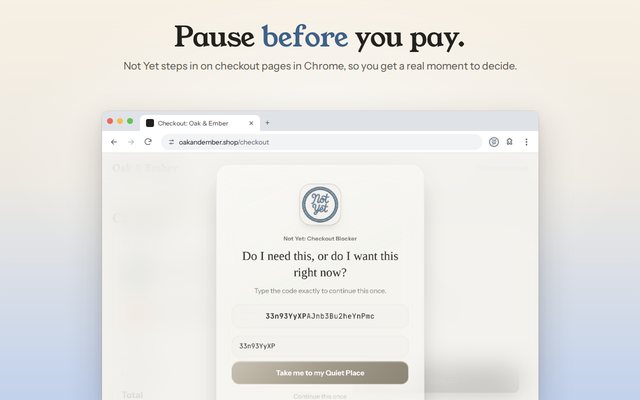
Not Yet: Checkout Blocker is a free Chrome extension that pauses checkout pages before you pay. On the stores you pick, the checkout itself, where the pay-later offer appears, gets a pause screen, and you retype a freshly generated code to continue. Two more parts of it are aimed at Buy Now, Pay Later:
- The Buy Now, Pay Later category covers the checkout and payment pages on Klarna, Afterpay, Affirm, Sezzle, and Zip's own websites.
- The buy-button shield, part of Not Yet Premium, covers pay-later buttons on store pages, like Klarna, Afterpay, Affirm, and Sezzle, so the pause shows up before you even reach checkout.
If the Payments Are Already Hard to Keep Up With
Contact the provider before a payment is missed and ask what they can do. In the US, a nonprofit credit counselor, like the agencies affiliated with the National Foundation for Credit Counseling, can help you look at the whole picture for free or at low cost.
Safari for iPhone, iPad, and Mac is coming soon.