A Holiday Gift Budget That Survives Cyber Monday
Holiday overspending rarely comes from the gifts you planned. It comes from the extras: the "one for them, one for me" purchase, the upgrade because it was 40% off, the thing that showed up in a countdown banner at 11pm. Black Friday is November 27 this year and Cyber Monday is November 30, and most sales have already started.
A gift budget doesn't need an app or a spreadsheet. It needs a list, a number, and a little friction at the moment you pay.
Step 1: Write the List Before You Browse
Write down everyone you're buying for. Next to each name, put a dollar amount, and if you already know the gift, write that too. Add a line for the things people forget: wrapping, shipping, a host gift, the office exchange.
The order matters. A list written before you open a store is a plan. A list written after is a receipt.
Step 2: Add It Up and Check It Against Cash
Total the column. Then ask one question: can I pay this in full by the time the January statement arrives? If not, lower the amounts now, while it costs nothing. Nobody on the list will know the difference between a $40 gift and a $60 one. You will know the difference in February.
Step 3: Shop the List, Not the Sale
A sale is only a saving on something you were going to buy. For each item on the list, check the price at two or three stores and buy it when it's fair. Then stop looking at that item. Prices keep moving all month, and chasing the last $5 is how you end up browsing for another hour.
Step 4: Give Everything Else 24 Hours
You will see things that aren't on the list. Some of them are good ideas. Put them in the cart or a note and come back tomorrow. If it still makes sense and the budget has room, swap it in for something else. Most of them won't survive the night, which is the point.
Countdown timers and "only 3 left" labels exist to stop you doing this. Treat them as a reason to wait, not to hurry.
Step 5: Make Paying a Little Harder
- Remove saved cards from the stores you use most. Typing a card number is a small pause that costs nothing.
- Skip Buy Now, Pay Later for gifts. Four payments across five stores is a budget nobody can keep in their head. We wrote about stepping back from it here.
- Unsubscribe from sale emails for the month, or filter them to a folder. You can resubscribe in January.
- Add a pause at checkout. This is what we built Not Yet for.
Where Not Yet Fits
Not Yet: Checkout Blocker is a free Chrome extension that covers checkout and payment pages with a pause screen. To continue, you retype a short code that's different every time. It takes a few seconds, which is long enough to look at your list and ask whether this purchase is on it.
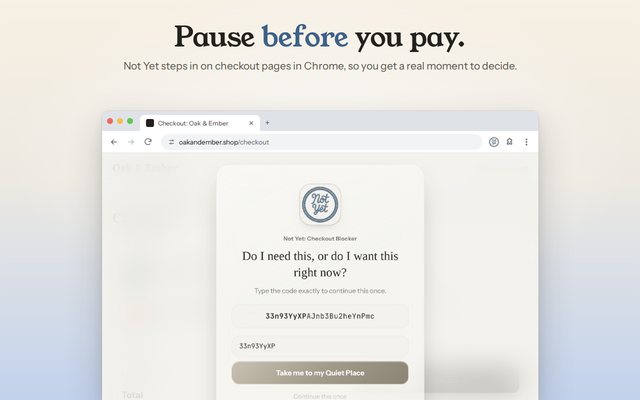
It doesn't stop you buying gifts. Planned purchases go through after the pause. For the sale weekend itself, you can also pause a tempting store completely for 1 to 24 hours, and it lifts by itself when the time is up. The free version does all of this, with no account, and nothing you do is sent anywhere.
After the Holidays
Keep the list. Write what you actually spent next to each planned amount. Next November, that page is worth more than any advice, including this.
Common Questions
How do I set a holiday gift budget?
Write down everyone you're buying for, put a dollar amount next to each name, and add it up. If the total is more than you can pay in cash by January, lower the amounts before you shop, not after.
When are Black Friday and Cyber Monday in 2026?
Black Friday is November 27, 2026, and Cyber Monday is November 30, 2026. Many stores start their sales a week or more earlier.
How do I avoid overspending on Cyber Monday?
Shop from a list you wrote before the sales started, buy only what's on it, and give anything else a 24-hour wait. A pause at checkout, like the one Not Yet adds, gives you a moment to check the list before you pay.
Using Safari on a Mac? Get Not Yet on the Mac App Store. iPhone and iPad are coming soon.