What's New in Not Yet: Time Limits, One Purchase for Both Browsers, and More
Not Yet has had a busy few weeks. Here's everything new, in one place, plus a look at the other app coming from the same developer.
Time Limits on Any Site Free
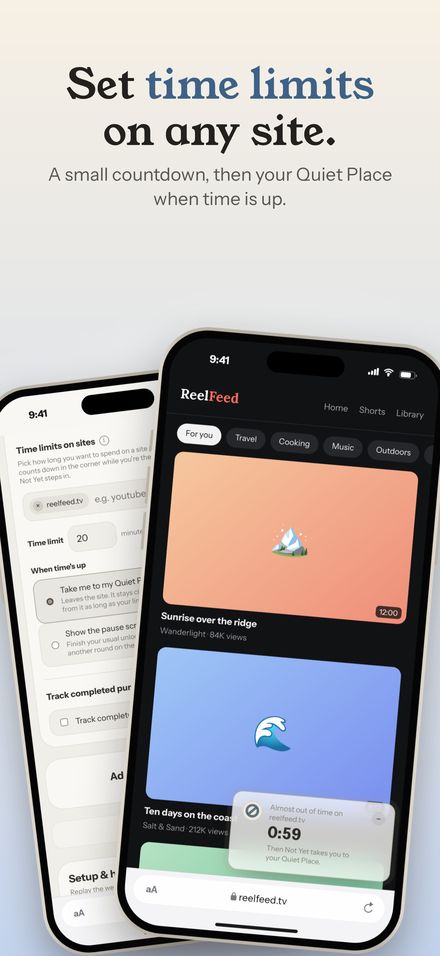
Some sites aren't a checkout problem; they're a time problem. Add them under Time limits on sites, pick a limit from 1 to 240 minutes, and a small countdown sits in the corner while you're there. Its last minute pulses so it never surprises you. When time's up, Not Yet sends you to your Quiet Place, or shows the pause screen if you'd rather earn another round. Time counts per visit, across tabs and page loads, so opening a new tab doesn't reset it. You can set it up in the welcome guide too.
One Purchase for Both Browsers
Premium works on Safari and on Chrome, each bought its own way. In the Not Yet app, it's monthly or a one-time lifetime unlock. On Chrome, it's a one-time Premium key, checked on your own computer, so there's still no server. And if you buy lifetime in the Not Yet app, Copy code for Chrome hands Chrome Apple's own signed record of your purchase. Chrome is covered at no extra cost.
A Rope That Looks Like Rope
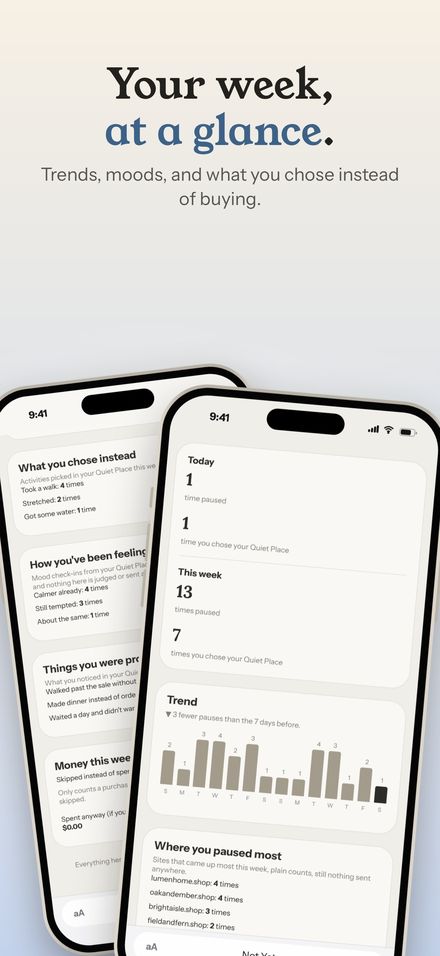
The border around Settings and the welcome guide used to be a dashed line that read more like stitching. It's now drawn as real twisted rope, like the one on the app icon. The same rope frames two new cards: your week at a glance on the Recap page, which is free, and the stats card in your Quiet Place.
A Little More Motion
The pause screen now glides in and the code's letters settle into place. The wait method breathes: an orb grows and shrinks while a ring fills over the wait. The recap's bars grow in and its totals count up. And when you skip a purchase and log the savings, a few leaves drift across your Quiet Place. If you'd rather the Quiet Place stay still, there's a setting for that: Keep it still.
Coming Soon From the Same Developer: Shotstand
Not Yet's 45 App Store screenshots, across iPhone, iPad, and Mac, were made in an app I built for exactly that job. It's called Shotstand, and it's coming to the App Store soon. It turns plain screenshots into a finished App Store set with real device frames, headlines, and every size Apple asks for, right on your iPhone, iPad, or Mac. It's free, with one $0.99 upgrade, no subscription, and nothing uploaded. It came out of frustration with screenshot tools that wanted a monthly fee or an account before they'd save one full-size image.
You can try Shotstand's real drawing engine in your browser on the Shotstand page, or read how Not Yet's screenshots were made.
Safari for iPhone, iPad, and Mac is coming soon.