Impulse Buying on a Student Budget: Keep a Pause Before Checkout
Student money is lumpy. It shows up all at once, from a paycheck, a refund, or help from home, and then it has to last. Meanwhile the spending is steady and small: a late-night order, a delivery fee, a sale that ends tonight. None of it feels like much on its own, and that's exactly why it adds up.
You don't need a strict budget app to fix this. You need a few small speed bumps in the places where spending actually happens.
1. Know When You Actually Spend
For a week, notice the moments you buy things you didn't plan to. For most students it's late at night, during a stressful week, or right after money lands. Once you know your moments, you know where the speed bumps go.
2. Pick a Weekly Number
Monthly budgets are hard to feel. A weekly number for the extras, like eating out, delivery, and online shopping, is easier to keep in your head. When it's gone, the rest waits for next week.
3. Treat Student Discounts With Suspicion
A student discount is a good deal on something you were already going to buy. On anything else, it's a reason to spend money you'd otherwise keep. Before you use one, ask whether you'd buy the thing at full price. If not, skip it.
4. Keep a Want List, Not a Cart
When something catches your eye, write it down with the date instead of leaving it in a cart. Look at the list on the day money comes in. Most of it won't feel as urgent by then.
5. Put a Pause in Front of Checkout
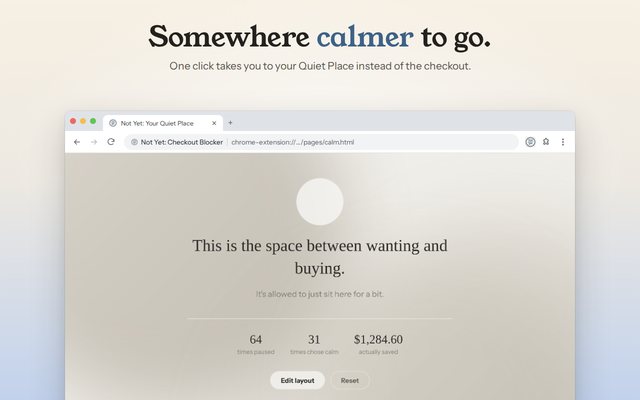
The late-night cart is where good intentions lose. Not Yet: Checkout Blocker is a free Chrome extension that covers checkout pages with a pause screen. To continue, you retype a freshly generated code, which takes just long enough to ask yourself if you really want this. You can still buy it. You just have to mean it.
- Turn on the categories you shop most, from clothing and beauty to food delivery and electronics.
- Set a time limit on sites where browsing turns into buying, anywhere from 1 to 240 minutes a visit.
- Block your weak spots outright with Block these websites during finals or a tight month, then take them off the list later.
6. Have Somewhere Else to Go
The main button on the pause screen opens your Quiet Place, a calm page where you can check in on how you're feeling and pick something to do instead. A short walk or a message to a friend beats a delivery order at 1 AM.
If a Week Goes Badly
One big order doesn't ruin anything. Notice what was going on, reset the number next week, and keep going. The goal is spending on purpose, not a perfect record.
Safari for iPhone, iPad, and Mac is coming soon.